
Best AI Interior Design Apps for Inspiration, Styling and Makeovers
I watched YouTube reviews and read countless articles on the "best AI interior design apps," but I still didn't know which tool to actually use. Most reviews had thin visuals—barely showing the apps or their AI outputs. And they all claimed the best tools were "easy for both professionals and DIY-ers"—which tells me they're probably not great for either.
So I tested 12 different apps myself. I used two projects I was working on: visualizing a sectional sofa in my living room and helping a friend come up with ideas for her new apartment.
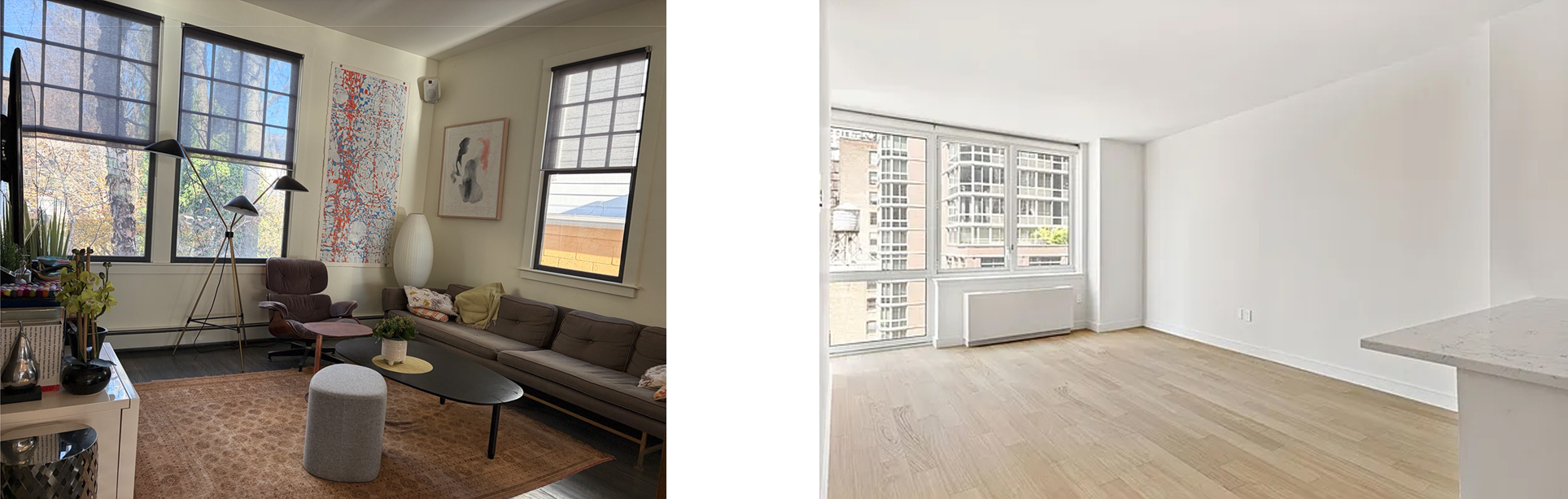
The projects I used to test the AI apps: (left) what would a sectional sofa look like here, and (right) what to do with this empty living room?
Here's what I discovered: asking "what's the best?" is the wrong question. The real question is "best for what?" Each app excels at something different.
So I've documented which tools work well for which specific situations—hopefully this saves you the time and frustration I went through.
━━━━━━━━━━━━━━━━━━━━━━━━━━━━
About This Review. I'm Angela, founder of Alcov. I tested these tools for my own interior design projects—visualizing a sectional sofa for my living room and generating some design ideas for a friend's apartment.
Yes, Alcov is featured here, but I've tried to be honest about my experience learning what each tool does best. Of course, take my recommendations with a grain of salt!
━━━━━━━━━━━━━━━━━━━━━━━━━━━━
The 5 Categories
1. Best for Real Estate Staging & Property Marketing
Winners: Collov.ai and InstantDecoAI
Use these when: You're virtually staging properties for Zillow, Airbnb, or rental listings—including cleaning up existing photos, decluttering, improving lighting, or showing spaces in different styles.
What I found: Collov.ai has laser-focused features for property marketing like "Multi-angle Staging." I tested it with my friend's empty apartment in Scandinavian style:
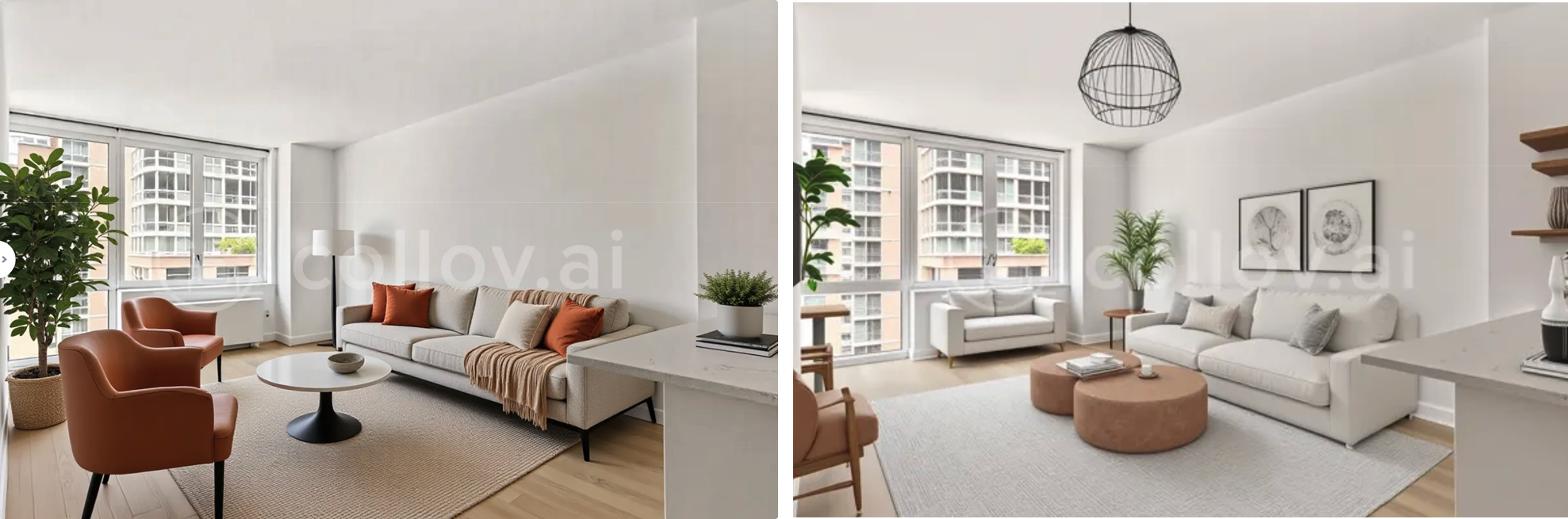
Rendering of the new apartment space from Collov
These renders work perfectly for virtual staging. They convey scale and stay generic enough (no overly personal touches) that potential buyers won't be distracted. Yes, there are AI quirks—chairs seemingly growing from walls—but that's very typical for AI-generated images.
InstantDecoAI bills itself specifically as a virtual staging tool. Both let you test features and pay only to remove watermarks.
Bottom line: Squarely targeted at property marketing professionals. If that's your goal, these tools nail it.
2. Best for Quick Room Makeovers & Style Exploration
Winners: Alcov and HomeVisualizerAI
Use these when: You want to explore different styles rapidly without knowing exactly what you're after.
Here's what makes these different: Most AI design apps require you to tell the AI what to change—which means you need to diagnose the problem and articulate the solution (design knowledge required). These tools flip that script. They're "show me possibilities" tools where AI generates options proactively and you just react and choose. No design expertise needed.
Testing results:
Alcov is mobile-first, making it very intuitive to use and fast. You could literally take it while touring apartments and visualize spaces in your style on the spot.
I uploaded my family room photo and was thrilled when Alcov automatically generated a couple of options with a sectional sofa—by far the best sectional sofa visualization from any tool I tested. I didn't actually ask for a sectional specifically, the AI just offered that as a possible layout for the space.
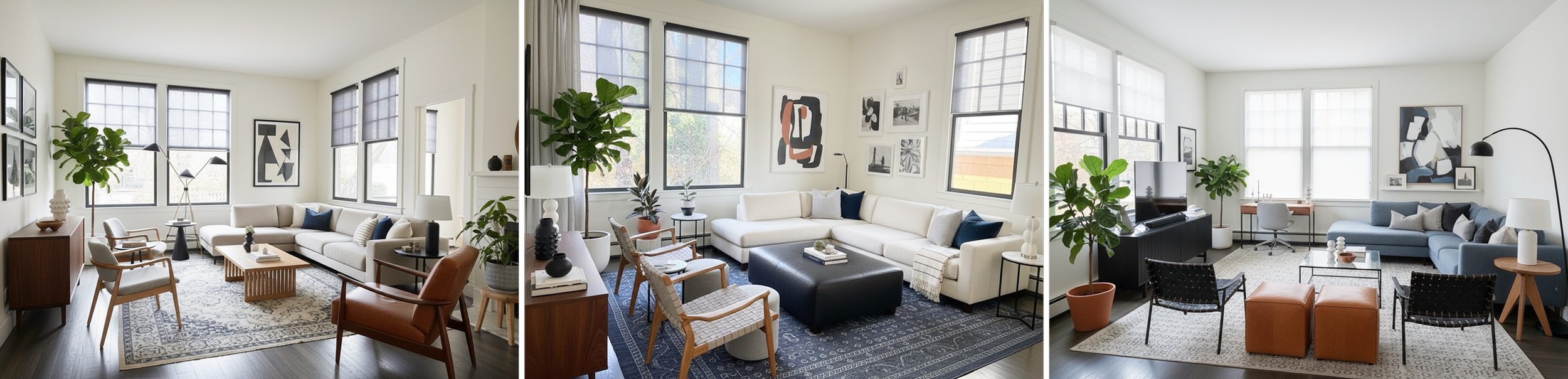
Alcov’s Modern Craftsman redesigns of my living room with a sectional sofa
Alcov doesn’t use traditional style names (Modern, Scandinavian, Industrial), the names and styles, like "Playful Charmer," "Modern Craftsman," and "Eclectic Spirit", are more about a mix of styles and a certain vibe. The results feel more realistic and lived-in than any other app.
HomeVisualizerAI is explicitly built for interior designers to visualize homes from drawings, plans, sketches, or inspiration photos. I'm including it here because it had the single best feature I tested across all the apps– their "Fusion" feature—which blends a photo of your space with an inspiration image.
My first attempt bombed completely (AI changed the entire room). But my second try with different inputs produced fantastic results:
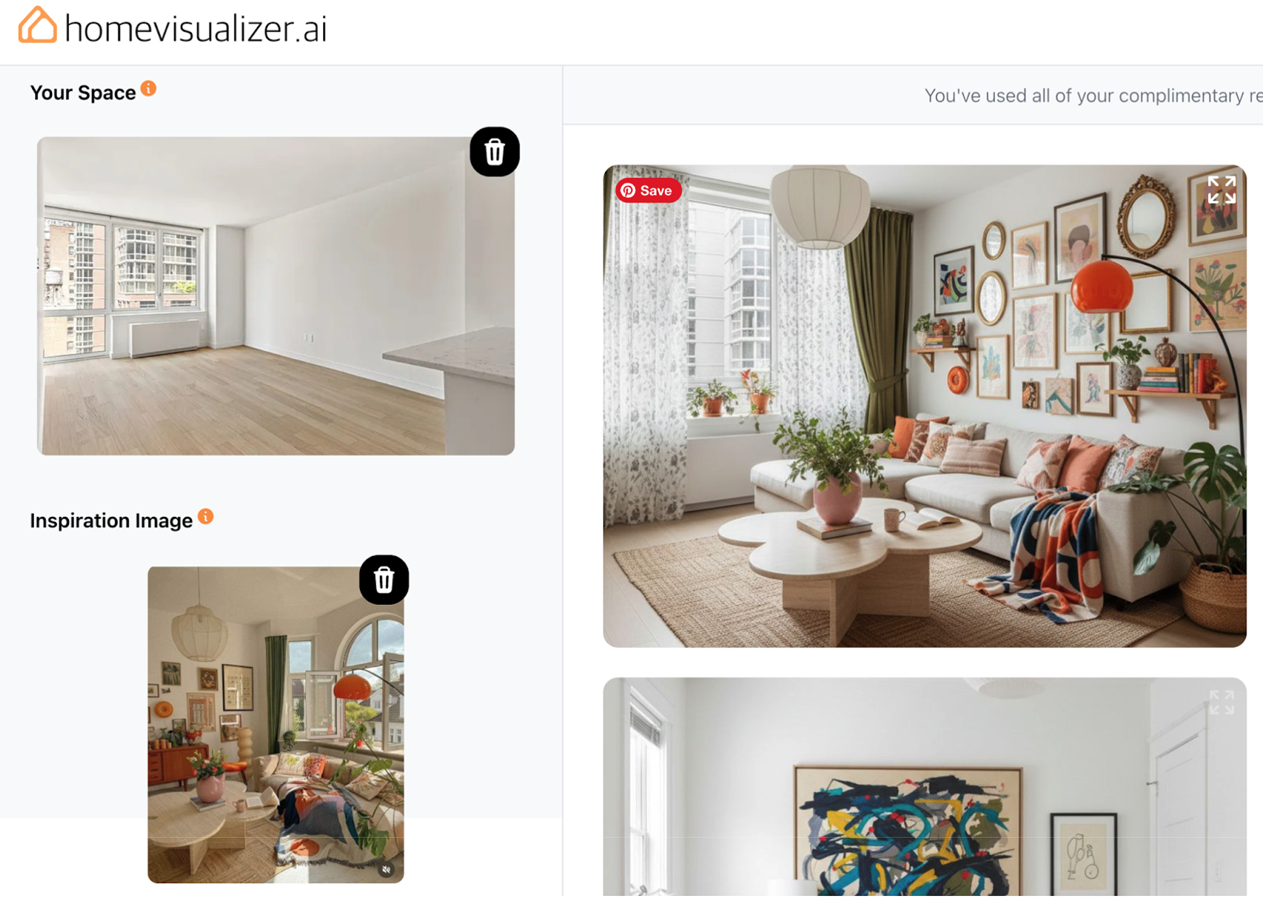
Homevisualizer’s ‘Fusion’ feature
Speed champions: These two were the fastest apps I tested—clear UIs, easy workflows, and the quickest image generation. Both offer free credits.
Best use cases:
Just moved and need style direction fast
Wanting to preview multiple styles before committing
Getting unstuck when you know something's off but can't pinpoint what
Bottom line: If you don't have design training and want fast inspiration, start here.
3. Best for Space Planning & 3D Visualization
Winners: Planner 5D and Homestyler
Use these when: You're planning renovations or complete redesigns requiring exact measurements, 2D/3D views, and specific furniture placement—or when you need measured drawings for contractors or building permits.
Reality check: Despite what many articles claim, these tools are NOT "easy to use for professionals and DIYers alike." I'm a trained architect who's worked with digital drawing tools my entire career, and I found these tedious. I would never recommend them to someone without design training.
Here's what they actually require:
The ability to think in plan view (that flattened bird's-eye perspective with measurements). This skill isn't universal, nor is it necessary for every project. As one design enthusiast told me when planning her move-in with her fiancé: "I didn’t need to draw anything, there was only one place for the couch to go."
Time and patience for trial and error. You need a project worth the upfront investment to learn each tool's quirks, load documents, and create measured drawings.
What I found:
Planner 5D
I had to sign up for a free trial (credit card required) to access AI features. Then I attempted my sectional sofa challenge, which required taking some measurements and inputting the floor plan of my family room.
First obstacle: If your room isn't a perfect rectangle or matches a pre-loaded shape—or if you have an open floor plan (my situation)—drawing your floor plan in the tool can be tediously time-consuming or outright impossible.
Next, I used the AI assistant to “auto-furnish” it. The results were bizarre: furniture crammed on one side with a regular sofa (not a sectional) awkwardly placed against the TV wall.
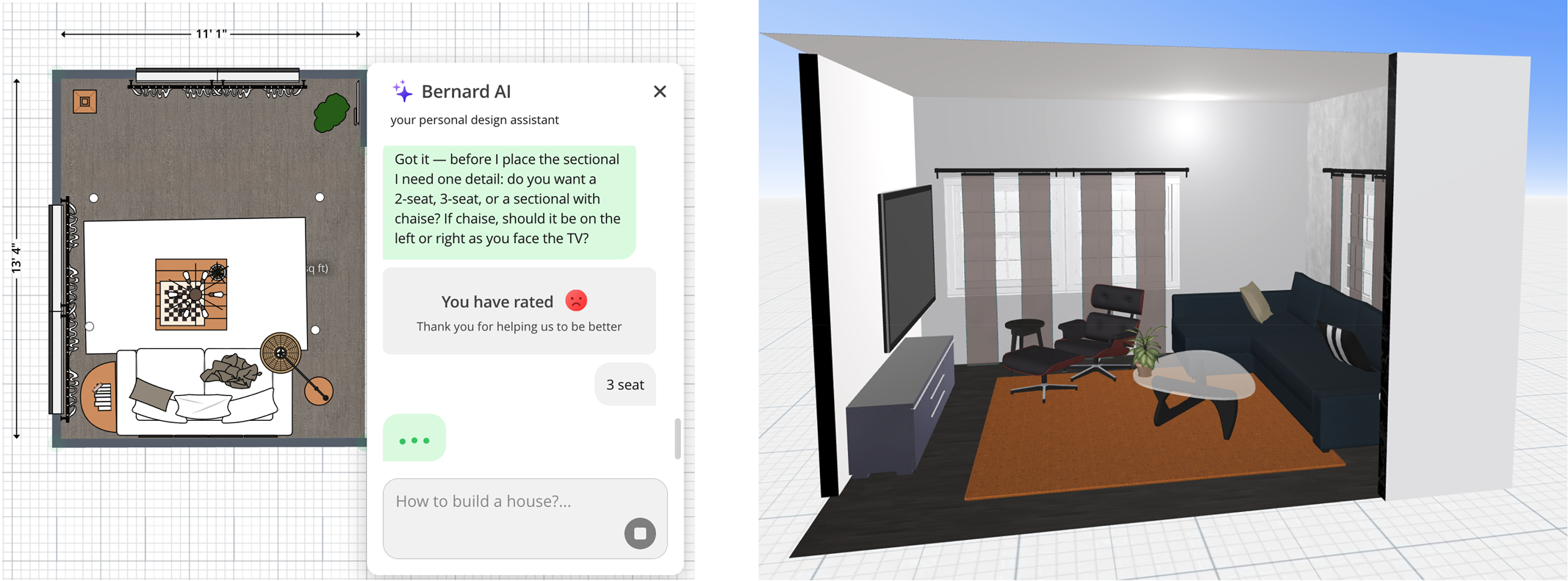
Planner 5D’s 2D-to 3D user interface and visualization of my living room
I eventually deleted the AI's furniture, selected a sectional from their library, scaled it manually, and placed it myself. Nice that they had an Eames chair (though I couldn't remove the ottoman). Then I clicked "3D" and got the rendering above on the right.
Is this helpful for visualizing how a sectional would look in my space? Somewhat. But it took considerable effort and the AI was in the prompting, not the image generation.
I also tried the Design Generator feature with my friend's empty apartment. It seemed to be working on it, with a "we'll email when done" message. Went to yoga, came back... still spinning, but the next morning I got this– not what I asked for– but pretty interesting renders:
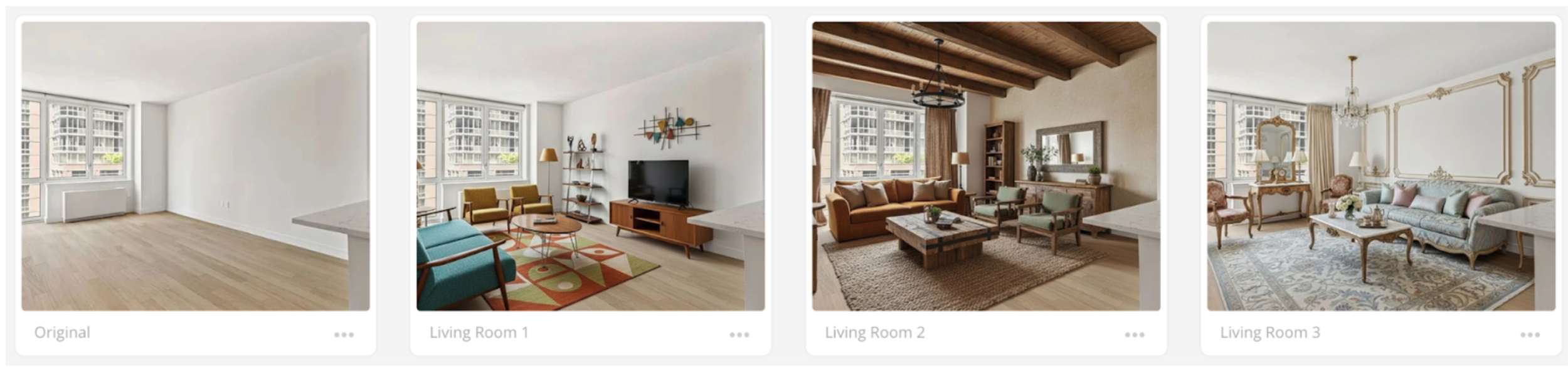
Planner 5D style renderings
Homestyler
One of the easiest to start: no login, no signup, no credit card. I went straight to the AI styling feature, uploaded a photo, and chose Japandi style:
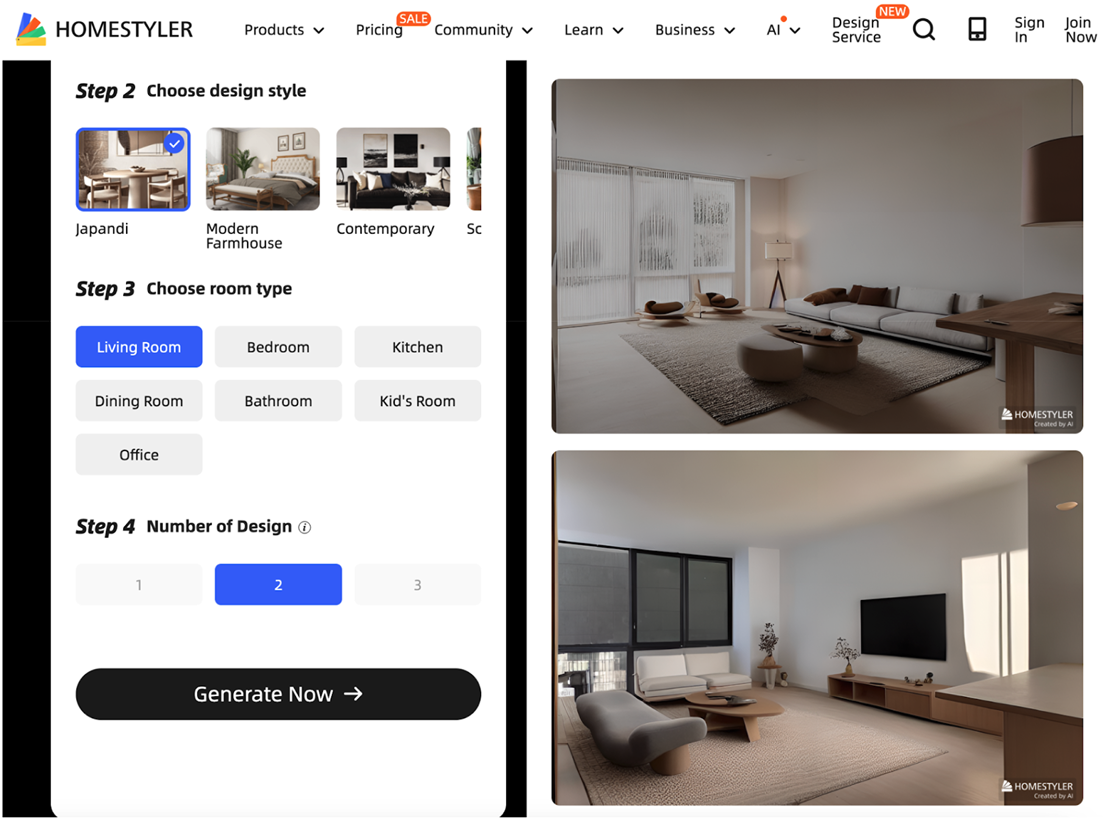
Homestyler’s AI renderings of the living room in a Japandi style
While there are nice elements, this obviously doesn’t look like a real space. Like Planner 5D, Homestyler is really built for creating 2D plans and projecting them into 3D models—I used it 3-4 years ago for a remodel “fly”-through I was designing and it was useful to show the client what the new space would feel like.
Bottom line: Established tools with robust professional capabilities, but AI features feel tacked-on and don't perform as well as newer, AI-native apps. Only worth the learning curve if you genuinely need measured drawings for contractors or permits.
4. Best for Designing With AI When You Know What You Want
Winner: REimagineHome (Beta)
Use this when: You have a clear design vision and need a photorealistic image, or you have a draft design to iterate on.
Important distinction: This is a "fix what I don't like" tool—you need to diagnose the problem and articulate the solution. It's great for professional designers or skilled laypeople who can specify exactly what they want changed. But here's the catch: the quality of output depends heavily on your prompting skills. The upside? REimagineHome's conversational AI is genuinely helpful.
What I found:
All interaction happens through a chat-like UI. I uploaded a room photo, chose Mid-Century Modern, and got the first image on the left:

REimagineHome’s AI of a Mid-Century Modern bedroom with iterates from a chat-like conversation
Then I prompted for changes: less formal feel, lounge chair, more eclectic furniture, more decor, and move the bench from in front of the dresser to the foot of the bed (center image with orange wall.)
The results weren't spot-on, but I appreciate how the AI is proactive—suggesting changes and reading back its understanding before rendering. This reduces pressure on getting prompts perfect.
After several rounds of back-and-forth, REimagineHome’s AI interpreted and consolidated my requests to this: "Paint walls soft greige; retain small orange pops (pillows/art); mix woods—walnut bed, light-oak nightstand, medium dresser; replace bedside lamps with two different styles (white dome on one side, slim brass or matte-black ceramic on the other); lighten rug to cream with subtle pattern for a fresher, youthful vibe." The result is the image on the right.
To its credit, REimagineHome was the only tool tested where I could explicitly ask for a sectional sofa in my render, however, the sectional visualization was wonky:
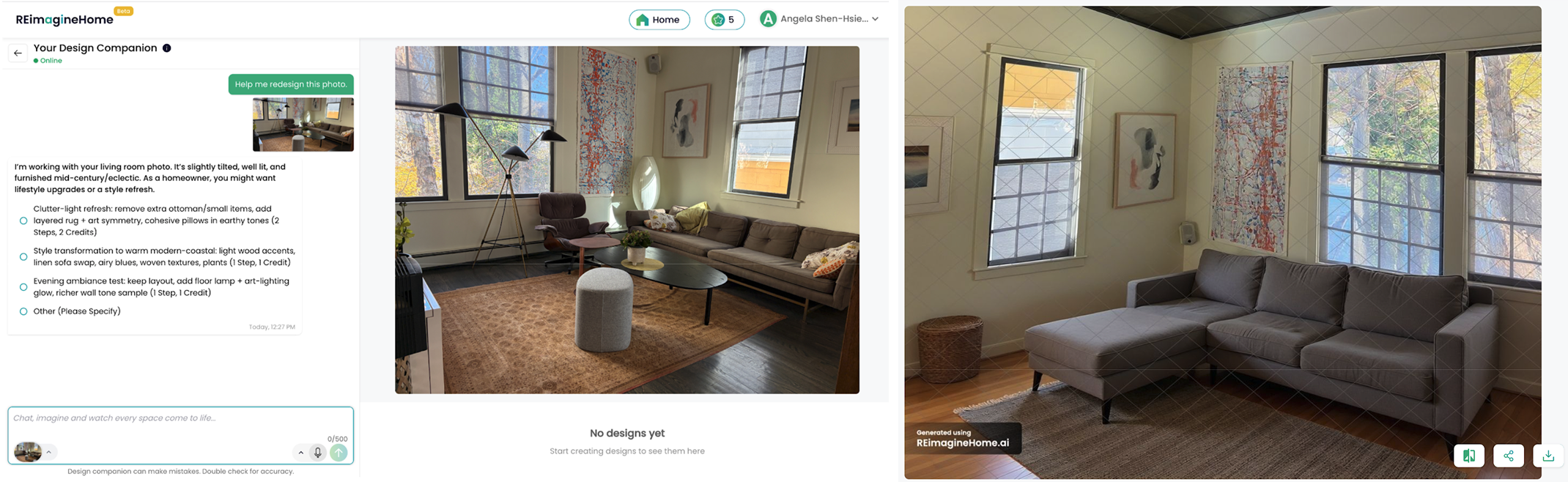
The AI confirmed: "The sofa was correctly replaced with a warm-gray L-shaped sectional with a left-hand chaise; other items stayed intact." Not quite– I think it flipped the room upside down, in fact!
You get free credits to try it (appreciated!)
Bottom line: Like a more targeted, knowledgeable ChatGPT for interior design. Great if you enjoy iterating and don't mind trial-and-error with prompting. Be prepared for multiple rounds to get results you want.
5. Best for Shopping & Finishing Touches
Winner: Alcov
Use this when: You're tackling the "long tail" of decorating—finding those finishing touches that pull everything together.
What Alcov does well:
Unlike most design apps that show you bare-bones styled rooms, Alcov generates spaces that look lived-in and complete—full of "stuff." This is hugely helpful when you're trying to figure out how to make your stuff look good, not just visualize a designer-perfect room.
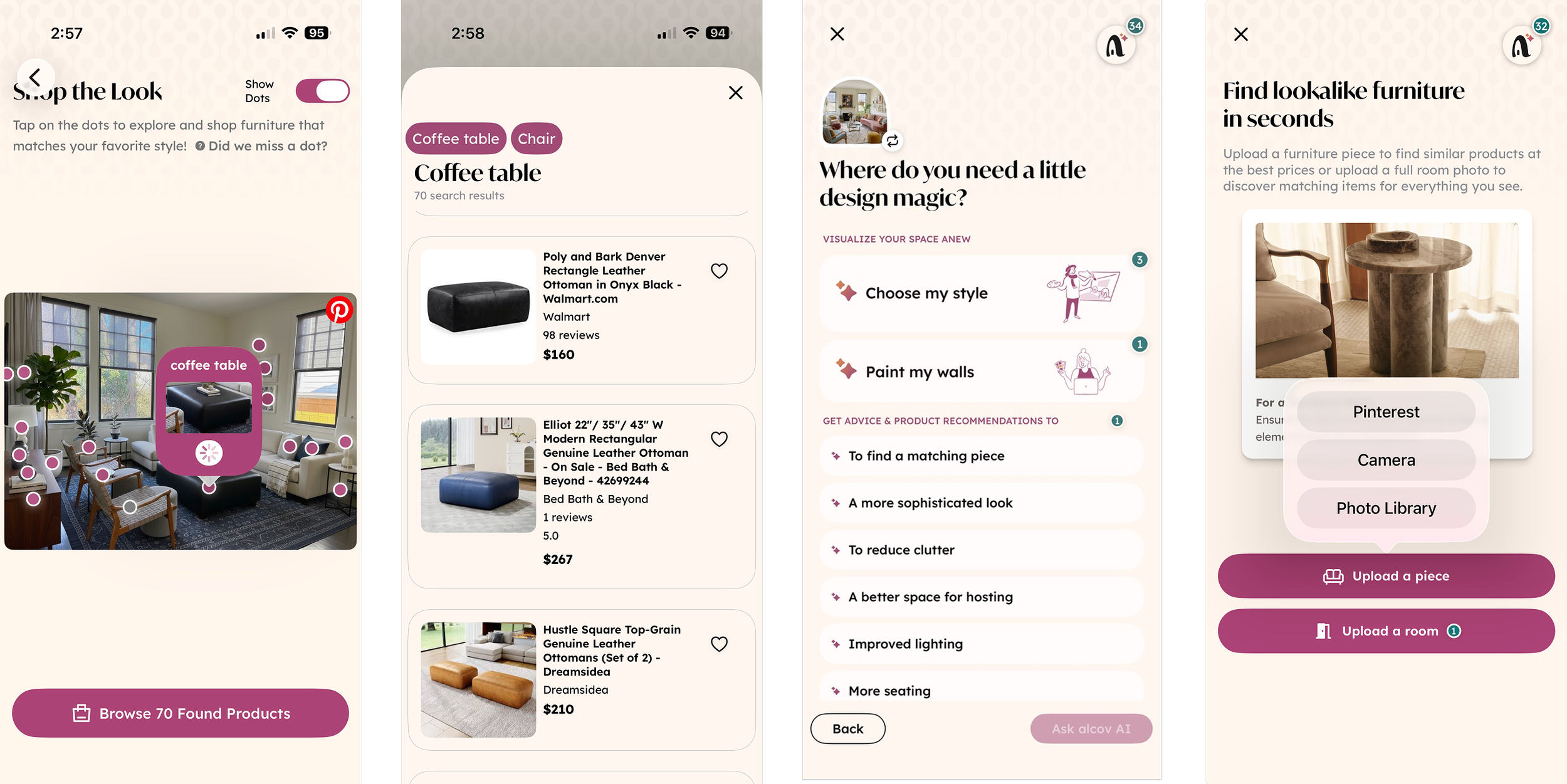
Alcov’s shopping and interior design advice features
The shopping features are integrated so you can shop from an image the AI generates or upload an inspiration photo or choose one from your Pinterest board and it'll find affordable dupes or similar pieces. Already have a sofa you love? Show Alcov a photo and it'll suggest pieces that work with it. The Pinterest integration keeps your style exploration and shopping organized in one place. There's even an advice feature for questions like "how do I get better lighting?"
Essentially, Alcov solves that maddening "I have all the pieces, but it still feels incomplete" problem.
My workflow recommendation: Use Alcov to get close to your vision, put that image into REimagineHome for detailed tweaks, then back into Alcov to find affordable dupes for the revised design.
Bottom line: Alcov excels at two ends of the process: initial inspiration when starting a project, and that crucial last 20% of styling that makes spaces feel personal and complete.
Tools I Tested That Didn't Make the Cut
Palazzo
Backed by Venus Williams, so I was excited to try it. Layout is similar to REimagineHome with chat on one side and image view alongside.
I liked that products in renderings linked to shopping pages, but the designs themselves lacked style and substance.
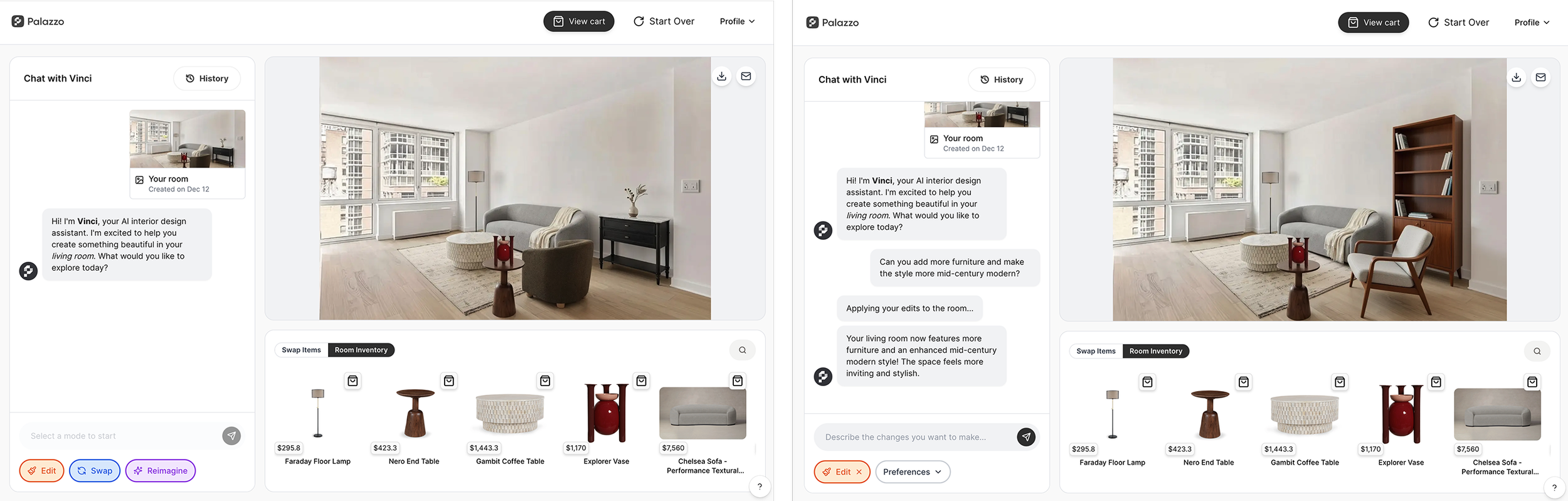
Palazzo’s
When I requested changes (more furniture and more mid-century vibe), results were not much better, unfortunately.
SPOAK
I spent time drawing my family room plan in SPOAK. The drawing tools were lighter-weight than Planner 5D or Homestyler (couldn't delete walls where my room opens to the kitchen).
Once I had the floor plan: nowhere to go. No 3D. No AI styling. Couldn't accomplish either use case.
Exploring their website, they seem to have pivoted toward becoming a portfolio site for interior designers to showcase work and offer services.
NewRoom
Couldn't get it to work—just error messages. Sorry!
Spacely.AI
Spacely had the best breadth of styles and a full menu of AI tools. Unfortunately, none of the 3 tools I tried worked as expected. Such a low percentage of useful results that I can't recommend it despite the promising interface.
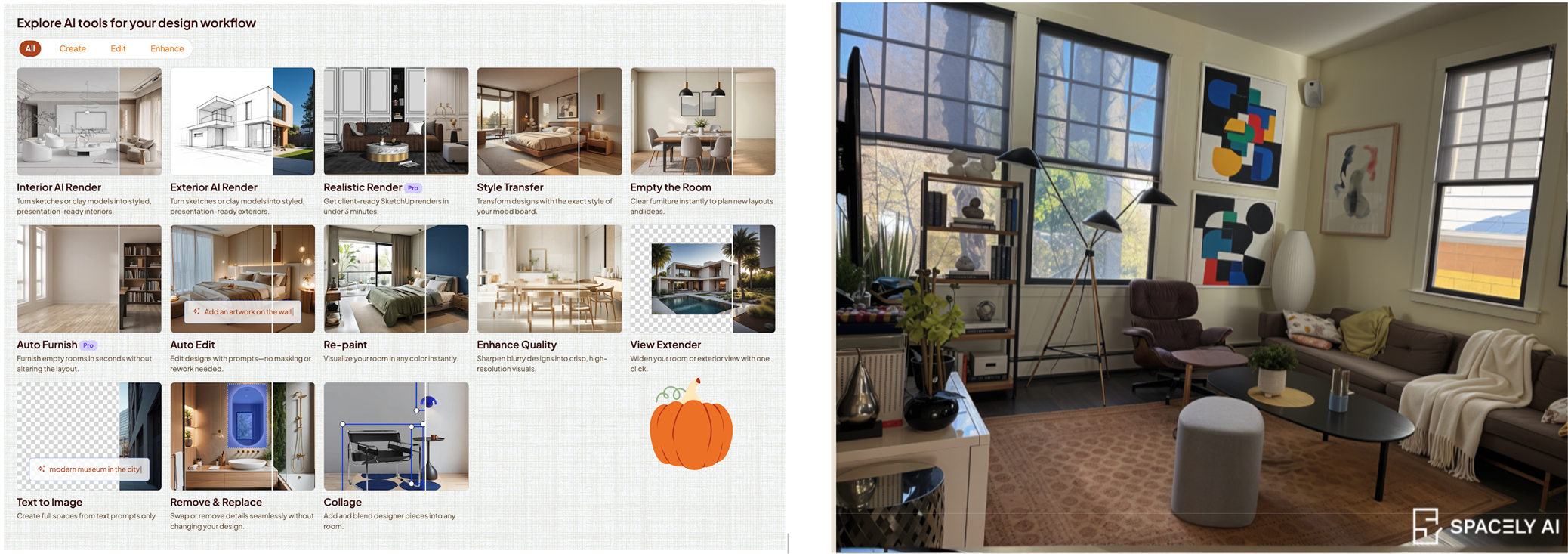
Spacely AI’s AI tools and “Contemporary” styling of my living room
I tried AutoFurnish for sectional layout help. After uploading my photo, I chose from an extensive style list (London, Shanghai, Kyoto, Paris Interior, Scandinavian Classic Nordic, Hygge-inspired, Lagom, Rustic Scandinavian, Traditional Classic European, Colonial, Victorian...). Selected "Art-Driven Contemporary" and got the above (right) image of my living room with a few awkward additions but not really a restyling.
Then I tried Style Transfer and Collage features on the empty apartment, trying to get a Japandi styling:

Spacely AI’s Japandi-style room visualizations
The Collage results had good image quality with decor and artwork filled in somewhat. But the room was completely changed with no seating opposite the coffee table—a common AI issue where algorithms struggle to distribute furniture evenly across spaces.
Decor Matters
Interesting gaming approach... but couldn't make it work for my use cases.
Final Thoughts
The best AI interior design app truly depends on your specific use case, design expertise, and time investment willingness.
Don't believe articles claiming any single tool is "best for everyone" or that all tools are equally easy to use—they're not.
The good news? Many tools offer free trials or credits. Test them with your actual project before subscribing.
Last updated: November 2024
Have you tried any of these tools? I'd love to hear about your experience—especially if you've found tools that work better for specific use cases!